




Keep Marriott Bonvoy Points Active
Marriott Bonvoy points expire after 24 consecutive months without qualifying activity in your account. When that happens, Marriott removes the entire balance, not just the older points, and expired points cannot be restored. The rule sounds strict, but the list of activities that count as “qualifying” is long, and several of them cost little or nothing.
This article explains exactly how the policy works, how to find your own expiration date, which activities reset the clock (and which ones do not), and the cheapest ways to protect a balance you do not plan to use soon.
The 24-Month Rule
Section 1.6.d of the Marriott Bonvoy terms states that a member must remain active to keep accumulated points. If an account has no qualifying activity for 24 consecutive months, all points in that account are forfeited.
Three details matter here:
- The clock resets every time a qualifying activity posts. As long as you earn, redeem, or buy points at least once every two years, your balance never expires.
- Expiration is all-or-nothing. Points do not expire in batches based on when you earned them. One inactive stretch of 24 months wipes the whole balance.
- Forfeited points are gone for good. Marriott does not reinstate expired points, so prevention is the only option.
There is also a longer-term rule: if an account shows no activity for five consecutive years, Marriott can deactivate the account itself, not just the points.
Lifetime Elite members are currently exempt
Points in Lifetime Elite accounts (Lifetime Silver, Gold, Platinum, or Titanium) are not subject to the expiration policy today. Marriott's own wording says it “may choose to apply” the policy to these accounts in the future, so Lifetime Elite members should not treat this as permanent. If you hold lifetime status, you will simply not see an expiration date in your account.
How to Check Your Marriott Points Expiration Date
Marriott shows your expiration date directly on both its website and mobile app.
On Marriott.com:
- Log in to your Marriott Bonvoy account.
- Navigate to your Activity or Overview page.
- Your expiration date appears alongside your points balance.
In the Marriott Bonvoy app (iOS or Android):
- Open the app and go to the Account section.
- The expiration date appears next to your current points balance.
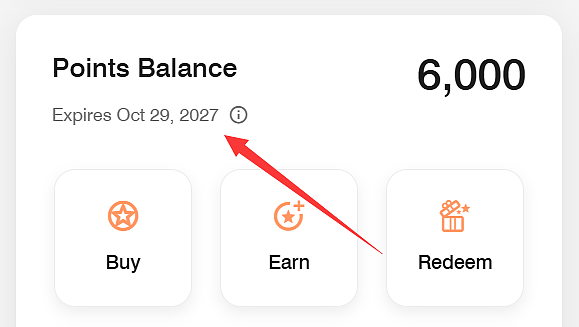
If Marriott has no record of activity for 24 months or more, you will see this message instead: “Our records show no account activity for at least 24 months. If you believe we missed something, please contact customer support.” If you see that message and you know you completed a stay or another qualifying activity that never posted, contact Marriott right away with the confirmation number or receipt. Missing activity can sometimes be added manually, but only if you ask before the deadline passes.
Activities That Keep Your Marriott Points Active
Marriott counts a wide range of earning, redeeming, and purchasing activity. Below is the full list grouped by type.
Earning points
- A completed paid stay at any participating Marriott hotel or resort (counts when the stay posts to your account)
- A completed stay at a vacation rental booked through Homes & Villas by Marriott Bonvoy
- Incidental charges earned without a stay, such as food and beverage, ski, or golf purchases at qualifying brands
- Dining at a participating Eat Around Town restaurant with a linked card
- Points from Marriott Bonvoy Tours & Activities
- Points from eligible Uber rides or Uber Eats orders after linking your accounts (U.S. only, restrictions apply)
- A completed Marriott Bonvoy Event or group booking (counts based on the event's departure date)
- Points earned on a co-branded Marriott Bonvoy credit card
- Points transferred from Chase Ultimate Rewards or American Express Membership Rewards
- A Hertz rental with your Bonvoy number attached (currently 500 points per rental)
- Starbucks earnings during Marriott Bonvoy Weeks promotions, Rakuten transfers, and BetMGM transfers
- Exchanging a Marriott Vacation Club, Sheraton Vacation Club, or Westin Vacation Club week or points for Bonvoy points
Redeeming points
- An award night at any participating property, including Homes & Villas rentals
- Non-stay redemptions such as Marriott Bonvoy Moments, merchandise, retail or dining gift cards, Marriott gift cards, or Boutique purchases
- Cruises booked through Cruise with Points
- Donating points to a non-profit organization
- Loyalty Dining redemptions
Other qualifying activity
- Buying Marriott points for your own account (minimum 1,000 points)
- Converting points to airline miles (based on the issue date) or converting airline miles to Marriott points (based on the transaction completed date)
- Converting points to or from other designated partners
- Buying a Marriott Bonvoy gift card with a Marriott co-branded card
- Merging two accounts, as long as one of the accounts is already active
The Cheapest Ways to Reset the Clock
Most members will never need to think about this because a hotel stay or a card purchase every two years takes care of it. If you are stepping away from Marriott for a while, these options keep the account alive with the least cost or effort.
Transfer 1,000 points from Chase or Amex. Both Chase Ultimate Rewards and American Express Membership Rewards transfer to Marriott at a 1:1 ratio with a 1,000-point minimum. This is the lowest-cost option for anyone who already holds one of those cards. Transfers usually post within a day, and 1,000 transferable points are worth only a few dollars in most other uses.
Buy 1,000 points. Marriott sells points at $12.50 per 1,000, or 1.25 cents each. You can buy as few as 1,000 and as many as 100,000 per calendar year. At 1.25 cents, the price is well above what the points are worth for a typical redemption (most independent valuations put Marriott points at roughly 0.7 to 0.85 cent each), so this is not a good way to build a balance. It is a reasonable way to spend $12.50 to protect a balance of several hundred thousand points.

Place a qualifying Uber or Uber Eats order. After linking your accounts (which must be associated with a U.S. phone number), eligible transactions occurring within the United States earn Marriott points. For Uber Eats, restaurant and grocery orders must be $40 or more (excluding taxes, fees, and tips). For rides, only premium or reserved vehicles (UberXL, Uber Black, Uber SUV, Uber Comfort, or UberX Reserve) qualify. Standard UberX rides will not earn points. A single eligible qualifying order resets your expiration clock.
Make a small donation. Donating points to a charity through Marriott's giving page counts as a redemption. If you would rather not spend money, giving away a modest number of points keeps the rest of the balance safe.
Convert a small number of points to miles. Airline conversions count as qualifying activity. Marriott's transfer minimum is 3,000 points (which becomes 1,000 miles), so this costs more than the options above, but it is useful if you were planning to move points to an airline anyway.
Use a Marriott credit card once. Any eligible purchase that earns points on a co-branded card counts. Note that paying the credit card annual fee, balance transfers, cash advances, or similar cash-like transactions do not earn points and therefore do not reset the clock. If you keep one of these cards for the annual free night, a single eligible grocery run each year is enough.
Pick whichever of these fits your situation and set a calendar reminder about 22 months after your last qualifying activity. That leaves time for a transfer or purchase to post before the deadline.
Activities That Do Not Count
This is where members get caught. The following actions may show up in your account activity but do not reset the 24-month clock:
- Gifting or transferring points to another Marriott member
- Receiving points as a gift or transfer from another member
- Earning points through social media programs
- Registering for a Marriott promotion (as opposed to completing the activity the promotion requires)
Marriott's terms describe this list as “including but not limited to,” so treat anything not on the qualifying list with caution. One point of confusion worth clearing up: member-to-member transfers do not count, but airline mile conversions in either direction do. Marriott states this explicitly.
If you are unsure whether something counted, check the All Qualifying filter on the Activity page after the item posts. If the date of your latest qualifying activity did not move, the activity did not reset your clock.
Converting Marriott Points to Airline Miles
Because airline conversions qualify, the details are worth knowing. Marriott transfers to roughly 40 airline programs at a 3:1 ratio (3 Marriott points to 1 mile), with a 3,000-point minimum per transfer. Air New Zealand is the exception: 200 points convert to 1 Airpoints Dollar.

For every 60,000 points you convert, Marriott adds a 5,000-mile bonus, which works out to 25,000 miles rather than 20,000. United MileagePlus members enjoy additional benefits through the RewardsPlus partnership: they receive a 10% bonus on converted miles, plus a 10,000-mile bonus for every 60,000 points transferred instead of the standard 5,000.
A few partners are currently excluded from the 5,000-mile bonus, specifically American Airlines AAdvantage, Avianca LifeMiles, and Delta SkyMiles. Check the transfer page for the current list before moving a large block of points.
Transfers can take several days to complete for some airlines, so do not use this method if your expiration date is only a day or two away. A Chase or Amex transfer into Marriott, or a purchase of points, posts faster.
Marriott Credit Cards Keep the Account Active Automatically
For anyone who spends regularly, a co-branded card is the easiest solution because every eligible purchase earns points and resets the clock. Current cards open to new applicants:
| Card | Annual Fee | Elite Status | Free Night |
| Marriott Bonvoy Bold (Chase) | $0 | Silver | None |
| Marriott Bonvoy Boundless (Chase) | $95 | Silver (Gold after $35,000 spend) | Anniversary night up to 35,000 points |
| Marriott Bonvoy Bountiful (Chase) | $250 | Gold | Up to 50,000 points after $15,000 annual spend |
| Marriott Bonvoy Business (Amex) | $125 | Gold | Anniversary night up to 35,000 points (Additional night after $60,000 spend) |
| Marriott Bonvoy Bevy (Amex) | $250 | Gold | Up to 50,000 points after $15,000 annual spend |
| Marriott Bonvoy Brilliant (Amex) | $650 | Platinum | Anniversary night up to 85,000 points |
All of these earn 6x on Marriott stays except the Bold, which earns 3x. Each also comes with elite night credits (5 for the Bold, 15 for most others, 25 for the Brilliant) that count toward status.
Several older cards, including the Ritz-Carlton card, the Premier Plus Business card, and the original Marriott Bonvoy Amex, are closed to new applicants but still earn qualifying points for existing cardholders.
The Bold card is the practical choice for someone who only wants an inexpensive way to stay active. It has no annual fee, so one small purchase every year or two keeps the account alive with no ongoing cost.
Tracking Expiration Across Programs
Marriott's 24-month window is generous compared with programs that expire points after 12 or 18 months, but a two-year gap is also easy to forget. A low-effort way to stay on top of it:
- Add a reminder to your phone calendar about 22 months after your most recent qualifying activity. Update it each time you complete a stay.
Also check the Activity page once or twice a year. Stays occasionally fail to post, and it is easier to fix a missing stay a few weeks after checkout than to argue about it two years later.
Summary
Marriott Bonvoy points expire after 24 consecutive months without qualifying activity, and the full balance is lost with no option to reinstate it. Lifetime Elite members are exempt for now. You can see your exact expiration date on the Activity page or in the app next to your points balance.
Keeping the account active requires one qualifying action every two years: a stay, an award night, an eligible card purchase, a transfer from Chase or Amex, an airline conversion, a points purchase, an eligible Uber order, a donation, or any of the other activities listed above. Gifting points to another member, receiving a gift, and signing up for promotions do not count. If you have a large balance and no upcoming travel, a 1,000-point transfer from a flexible currency or a $12.50 points purchase is the simplest insurance.















All Comments (0)