




Agoda Payment Options
When booking hotels through Agoda, travelers often face confusion about payment options. Questions arise like whether to pay upfront or later, how fees might apply, and what risks come with exchange rates. This can lead to unexpected costs or missed opportunities for flexibility.
In this article, we’ll address these issues by explaining Agoda’s three main payment options: “Pay Now”, “Book Now Pay Later”, and “Pay at the Hotel”. We’ll break down each one, highlight key considerations based on Agoda’s policies, and offer practical steps to choose the best option for your trip.
Supported Payment Methods on Agoda
Agoda accepts various payment methods depending on the display currency (the currency displayed to you on Agoda), which the platform detects automatically during checkout.
For example, when you opt to make a payment in USD, options include Visa, Mastercard, American Express, JCB, Discover, Diners, UnionPay Credit Card, Afterpay, PayPal, PayPay, Affirm, Paidy.
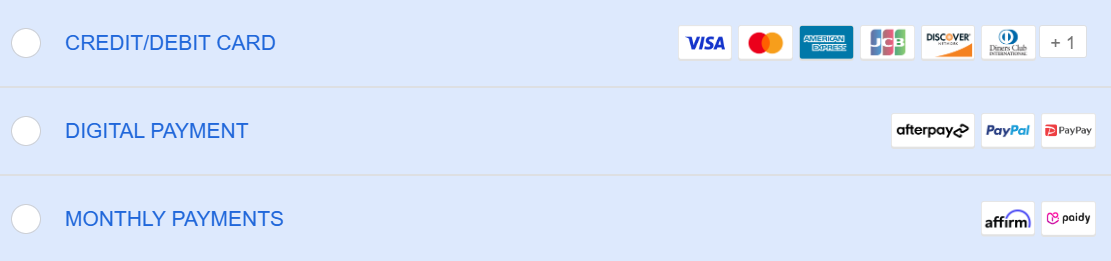
When you choose to pay in HKD, you can use the following payment methods: Visa, Mastercard, American Express, JCB, UnionPay Credit Card, Alipay HK, PayPal, PayPay, Affirm, Paidy.
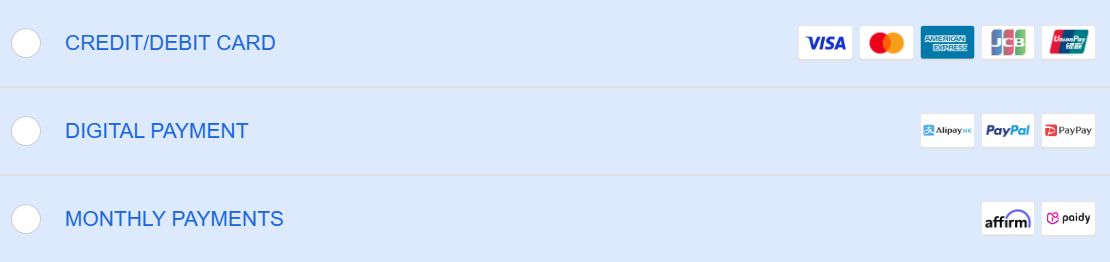
These methods appear automatically during checkout. To confirm what’s available, check Agoda’s payment page for your region.
If you use a credit card outside Singapore, where Agoda is headquartered, your bank may charge a foreign transaction fee of 1% to 3%. To offset this, Agoda may offer to refund the fee through AgodaCash as a promotional incentive. You can reach out to Agoda customer service to check if this option is available.
The Pay Now Option
The “Pay Now” option on Agoda requires full payment at booking and is the default for most hotels, covering both non-refundable and free-cancellation reservations. It supports major credit cards (Visa, Mastercard), PayPal, and region-specific methods like Alipay in Hong Kong. Choose this option when your travel plans are confirmed, as it locks in the price and protects against currency fluctuations.
Hotels set prices in their local currency, and Agoda displays them in your local currency based on your IP or account settings, using the Bloomberg Generic Composite Rate. You can switch currencies manually without any loss from exchange rates.
To avoid a 5% surcharge, per Agoda's terms (Section 8.1), ensure the charge currency (the currency in which you are charged for a booking) matches the display currency at checkout.
Exceptions apply: no surcharge if using a U.S.-issued card in USD, booking from the U.S., Canada, or U.K., or using an India-issued card for Indian hotels, even if currencies differ.
For example, an Australian user booking a Japanese hotel sees prices in AUD by default and pays in AUD, avoiding extra fees. If you switch to JPY (hotel's currency), you must select JPY as the charge currency at checkout to avoid a 5% surcharge.
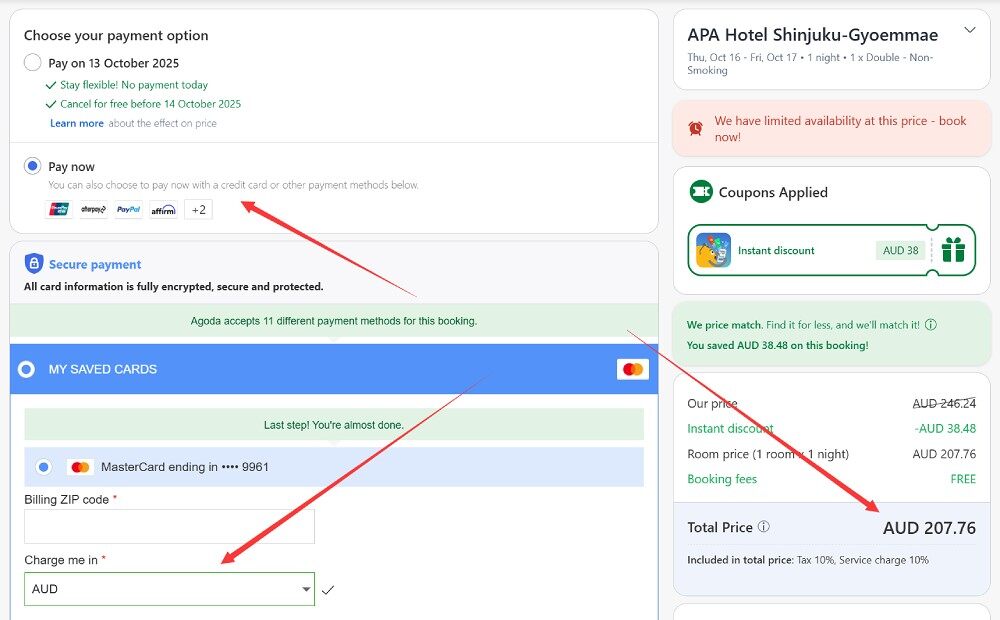
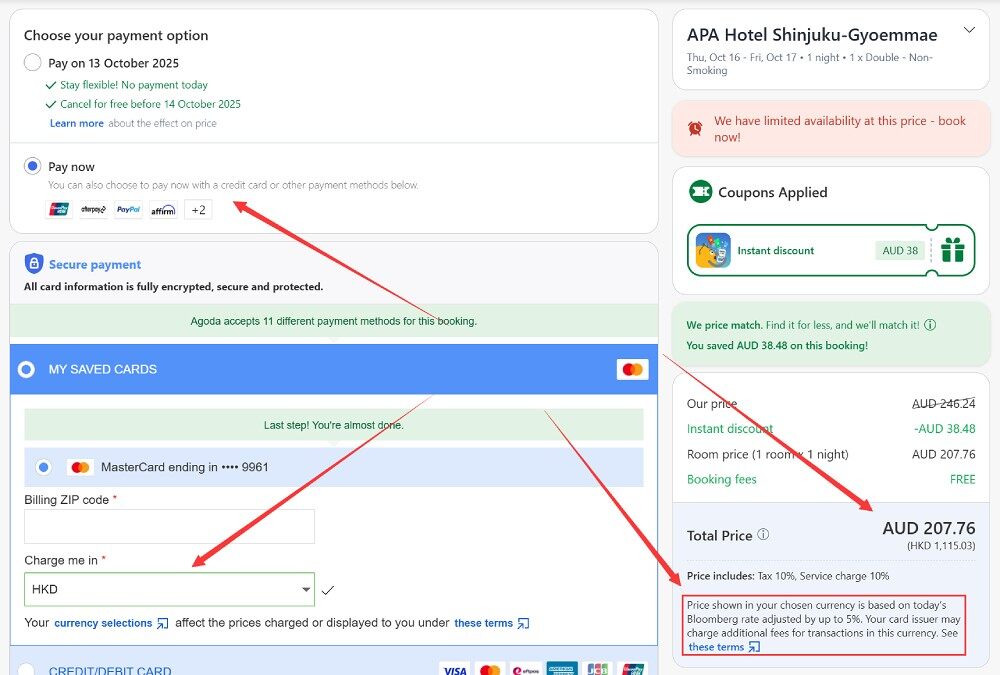
For refunds on free-cancellation bookings, the amount returned matches what you paid, but to avoid exchange rate losses, ensure the displayed and charge currencies align with your payment instrument’s currency.
For example, an Australian user booking a hotel in Japan should choose AUD as the charge currency when using an AUD-based card. If they select JPY instead, any refund will be issued in JPY for the same amount as the original payment. However, when their bank converts this refund back to AUD, changes in exchange rates may result in receiving more or less than the amount originally paid.
If you’re not a Singapore resident, your bank might add a 1% to 3% foreign transaction fee on the booking. Cancellations could mean paying this fee twice—once on payment and once on refund—since banks typically don’t reimburse it. Check your bank’s terms before booking. Refunds process in days to weeks, so plan accordingly.
The Book Now Pay Later Option
“Book Now Pay Later” lets you reserve without immediate payment. Instead, Agoda deducts the amount closer to check-in, often a week or a day before, based on the hotel’s rules. This requires a credit card guarantee, and it limits payment to major cards or PayPal—no local methods.
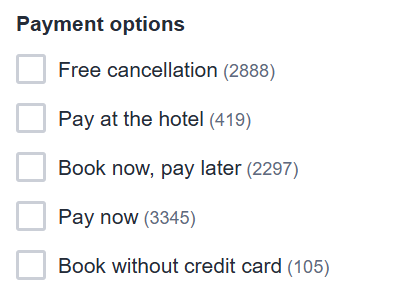
This option suits uncertain itineraries or tight budgets, as it avoids upfront costs and allows easy cancellation before deduction without the 1% to 3% foreign transaction fee. It also helps secure rooms in high-demand areas early. Fewer hotels offer it—about one-third fewer in places like Tokyo compared to “Pay Now”—so filter searches on Agoda for this feature.
For “Pay Now” bookings, an additional 5% surcharge applies if your display currency differs from your charge currency. This means the amount deducted immediately includes the uplift if those two do not match.
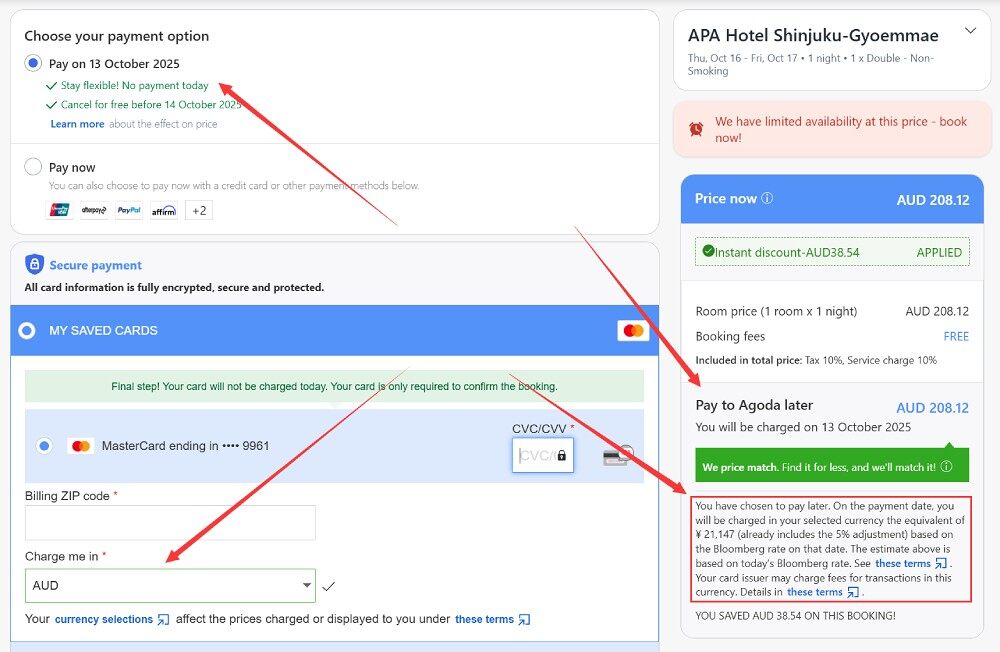
The same rule extends to “Book Now Pay Later”, but with an extra layer: even if display and charge currencies align, a 5% fee kicks in if the charge currency differs from the hotel’s currency. This dual condition makes pay later more prone to fees, as users often overlook the hotel’s base currency.
To avoid the 5% surcharge, per Agoda's terms (Section 8.1), ensure the displayed and charge currencies align with the hotel’s currency at checkout.
Consider an Australian traveler booking a Japanese hotel (local currency: JPY) selected AUD for both display and charge. With “Pay Now,” no 5% fee applies since the display matches the charge. However, with “Pay Later,” the fee adds because the charge (AUD) differs from the local (JPY), increasing the total by 5% at payment.
If you select JPY as both display and charge currencies, no fee applies since display matches charge, and charge matches local.
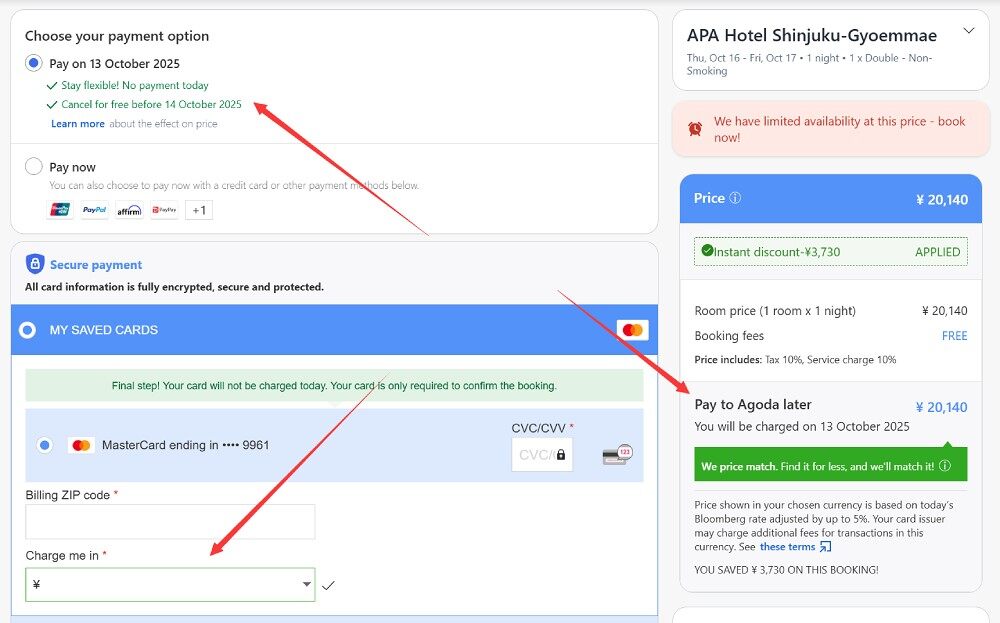
As shown in the image above, the system may still show a fine-print note: “Price shown in your chosen currency is based on today's Bloomberg rate adjusted by up to 5%.” This implies a potential fee, but since no conversion is needed, the price remains unadjusted. This message is likely a system bug, as it should only appear when display and charge currencies differ.
The Pay at the Hotel Option
“Pay at the Hotel” means no payment through Agoda; you settle directly at check-in in the local currency. Most require a credit card guarantee to hold the room, with no-shows possibly charged the full amount. A variant allows booking without a credit card, but it’s rare.
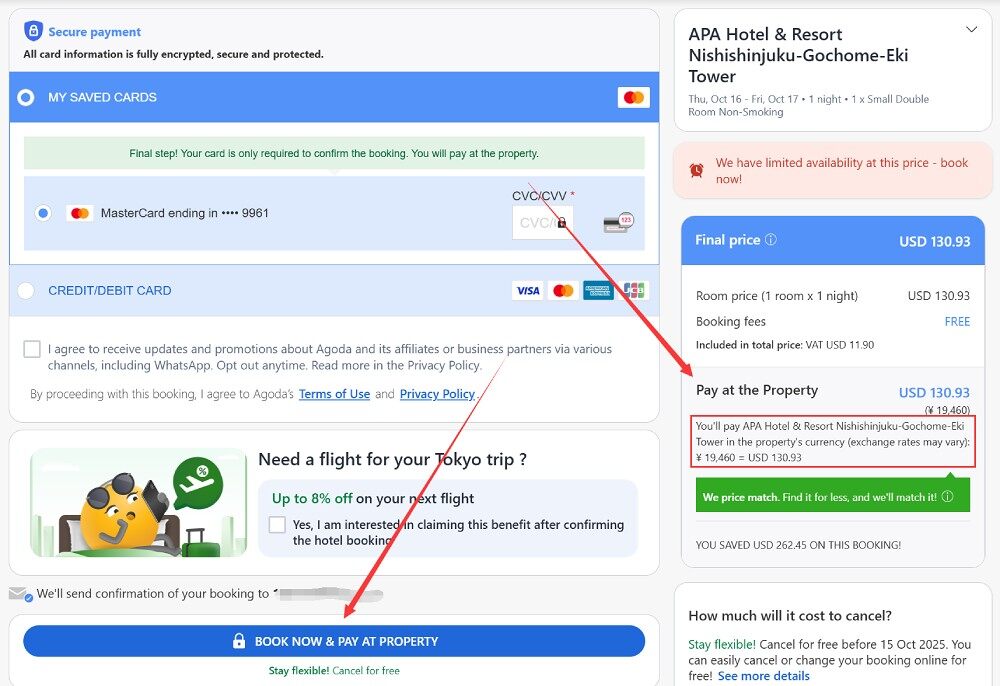
Hotels decide accepted payment methods, often cash or cards, with some smaller properties insisting on cash only. This avoids Agoda’s 5% exchange rate fee since payment is local. It’s useful if you prefer on-site transactions or lack immediate funds.
Availability is low—only about one-eighth of Tokyo hotels support it—and prices can be higher than “Pay Now” or “Book Now Pay Later” options. Prepare local cash if needed, and note that card payments at the hotel might still trigger your bank’s 1-3% foreign fee. Use Agoda’s filters to find these listings, and confirm policies via the hotel’s website or Agoda’s details page.
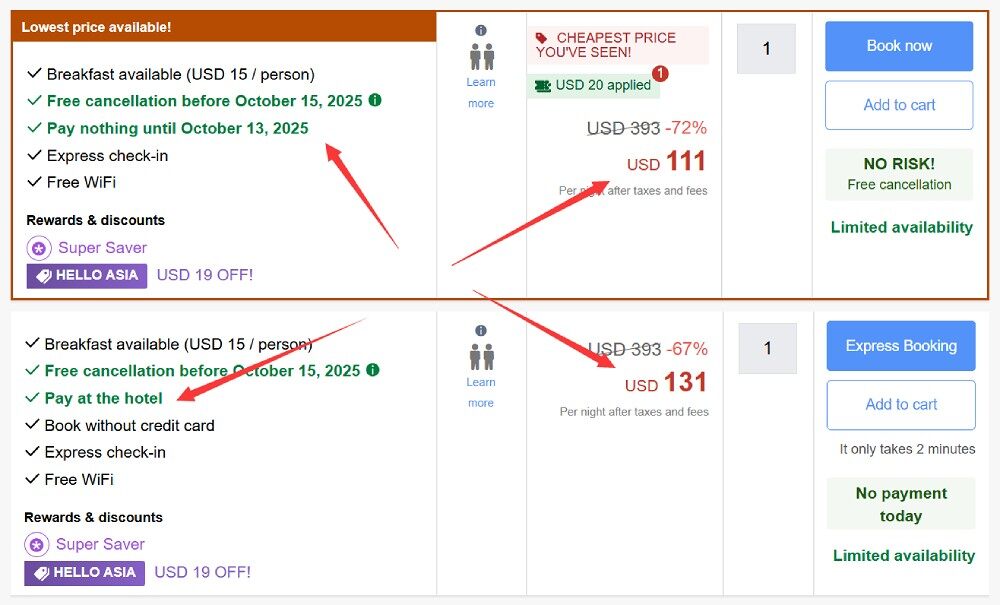
If you opt to book without using a credit card, you might wonder about the potential risks this poses for both Agoda and the hotel, as well as how they assess and manage those risks.
Hotels decide whether to permit bookings without a credit card guarantee based on room availability for specific dates. When there are plenty of rooms and demand is low, hotels are more likely to offer this option to boost reservations. However, during peak demand periods, they may limit it to minimize the risk of empty rooms due to no-shows.
Agoda uses its Determine Intent To Stay (DITS) system to evaluate risks in no-credit-card bookings. This tool contacts guests 12 to 72 hours before the free cancellation period ends via SMS, email, the Agoda app, or WhatsApp. It sends reminders and seeks confirmation, continuing until a response is received.
Managing Fees and Exchange Rates
A common issue is the 1-3% foreign transaction fee from banks for users outside Singapore on international charges. It applies to bookings and refunds separately, so cancellations double the loss. “Book Now Pay Later” dodges this if canceled early.
The 5% exchange rate fee occurs when your charge currency differs from the displayed or local one. Always select matching currencies during booking on Agoda to prevent this. For multi-currency trips, use a card without foreign fees, like certain U.S. or European travel cards—verify on your issuer’s site.
Conclusion
Choosing the right Agoda payment option depends on your trip’s certainty and budget. “Pay Now” offers security for fixed plans, “Book Now Pay Later” provides flexibility, and Pay at the Hotel suits local payments despite limitations.
To optimize your Agoda bookings, prioritize “Pay Now” and align your display and charge currencies with your local currency to eliminate the 5% exchange rate fee. For flexible plans, choose “Book Now Pay Later”, ensuring currencies match the hotel's local currency and canceling before the deduction date to avoid the 1-3% foreign transaction fee. Avoid pay at the hotel or no-credit-card bookings unless essential, as they often cost more and limit choices.
By matching currencies and understanding fees, you can save money and reduce risks. Review Agoda’s terms and your bank’s policies for each booking to make informed decisions.














All Comments (0)