



Booking a hotel through Agoda should end with a confirmation email arriving in your inbox shortly after payment. This email includes essential details like your booking voucher. However, some travelers face the issue of not receiving it, leading to concerns about whether the reservation went through.
This can happen due to email filters or input errors. In this post, we outline practical steps to address the problem based on Agoda’s processes.
Check Your Email Settings First
Start by examining your email inbox thoroughly. Often, Agoda’s messages land in the spam or junk folder because of strict filters from providers like Gmail or Outlook.
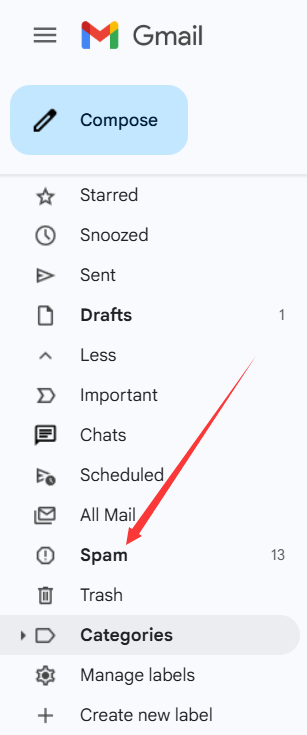
Log into your email account and search for “Agoda” in all folders, including spam. If found, mark the email as not spam to ensure future deliveries.
If the email is absent, wait up to 30 minutes post-booking, as delays can occur. For immediate access, log into your Agoda account on their website or app to view the booking details directly.
Correct Any Email Address Mistakes
A common cause is entering an incorrect email during booking. Typos like missing letters or wrong domains prevent delivery.
If you have an Agoda account and were logged in, visit agoda.com, sign in, and go to “Profile.” Verify the email listed and update it if needed. Then, request a resend of the confirmation.
Without an account, recovery is harder without the booking number. In such cases, note the exact details you entered for later verification.
Contact the Hotel for Verification
Since Agoda forwards booking info to the hotel upon payment, reach out to them directly. Use the hotel’s contact from their official site or Agoda’s listing.
Provide your name, check-in date, and any known details. Ask them to check their system for your reservation. If confirmed, they can assist in contacting Agoda to update your email and resend the confirmation.
This step works well for urgent trips, as hotels often respond quickly via phone or email.
Get Help from Agoda Customer Service
If other methods fail, contact Agoda support. You’ll need a booking number, but if unavailable, create a temporary booking with free cancellation and no upfront payment to obtain one.
Use this number to reach support through Agoda’s help center at agoda.com/contact. Explain the situation, provide payment proof like credit card statements, and request they locate your original booking.
Once resolved, cancel the temporary one. Agoda’s policy allows such inquiries, but prepare details like transaction time for faster help.
Conclusion
Not receiving an Agoda confirmation email is usually fixable with these steps, ensuring your trip proceeds smoothly. Always register an Agoda account beforehand to manage bookings easily and screenshot the success page after payment for records.
By following these, you maintain control over your reservations and avoid similar issues in future travels.














All Comments (0)