




Booking.com Rewards & Wallet
Booking.com offers a Rewards & Wallet system that lets users earn credits from bookings and other activities. These credits can reduce costs on future trips or provide cash back. This program suits frequent travelers who use the platform for hotels, flights, and rentals.
In this article, we’ll break down how it works, based on official details and practical insights. You’ll find step-by-step explanations and actionable advice to make the most of it without overlooking key rules.
To learn more or get started, check out the official Booking.com Rewards & Wallet page. If you’re already a user, log in to check your wallet balance.
What is Booking.com’s Rewards & Wallet?
The Booking.com Wallet serves as a central place to store and track credits earned through the platform’s rewards program. Once you have a Booking.com account, the wallet activates automatically. It holds two main types of credits: Travel Credits and Cash Credits, which come from activities like promotional partnerships.
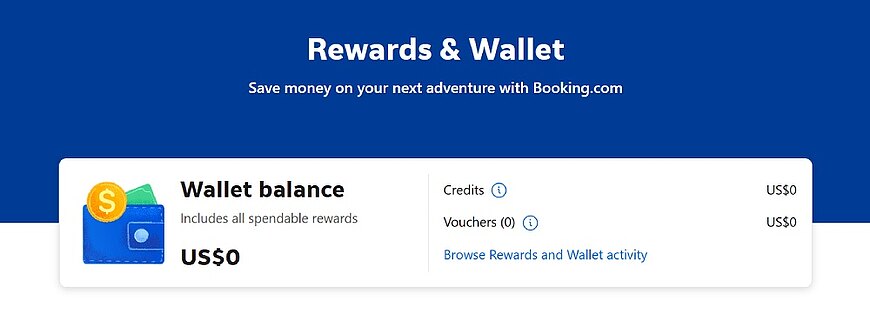
To access your wallet, log in to your Booking.com account, go to “Your Account,” and select “Rewards & Wallet.” You can also visit the direct page at booking.com/wallet. From there, check your balance, view transaction history, and see expiration dates for any credits.
Types of Credits
Credits come in two main forms: Travel Credits and Cash Credits.
Travel Credits have a set monetary value and can only be used to pay for eligible bookings on Booking.com, such as select accommodations, flights, car rentals, attractions, taxis, or added insurance. They cannot be withdrawn as cash.
Cash Credits also have a monetary value but offer more flexibility. You can use them like Travel Credits for bookings or transfer them to a linked Visa or Mastercard credit or debit card stored in your account settings.
In some cases, rewards may include vouchers, which apply only to specific bookings and cannot be combined with other vouchers on the same order. However, you can use credits and a voucher together if the booking qualifies.
How to Earn Credits
Credits are primarily earned through targeted promotions, often tied to credit card partnerships. For example, collaborations with card issuers like Mastercard may offer rebates of up to 10% on eligible bookings. To qualify, book through a specific promotional link on Booking.com’s website and pay with the partnered credit card.
After completing your stay, credits typically appear in your wallet within 14 business days, though it can take up to 60 days. Always review the promotion’s terms on the partner’s site or Booking.com to confirm eligibility. For instance, ensure the accommodation accepts credit card payments, as some do not.
Using Travel Credits for Bookings
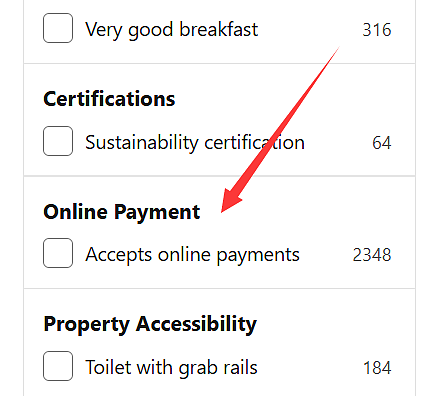
To use Travel Credits, select bookings that support online payments. During search on Booking.com, apply filters for “Accepts online payments” to find eligible properties.
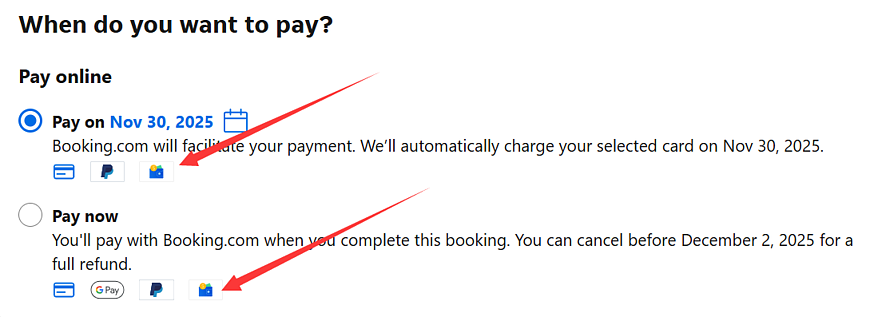
At checkout, choose “Pay on xxx” or “Pay Now”, and apply your credits. If the booking cost exceeds your credit balance, pay the remainder with another method.
If you cancel a booking paid with Travel Credits, refunds depend on the cancellation policy. For refundable bookings, credits return to your wallet; non-refundable ones do not. Always read the property’s terms before confirming.
Withdrawing Cash Credits
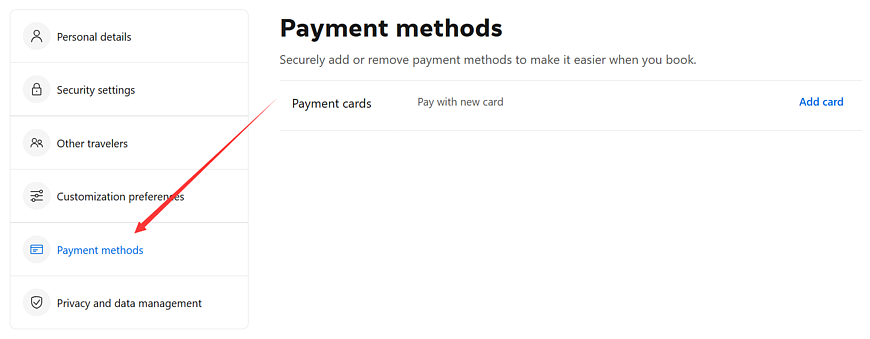
Cash Credits offer flexibility by allowing withdrawal to a saved Visa or Mastercard. First, add your card details in the payment methods section of your Booking.com account. Then, in the wallet, select the withdrawal option and follow the prompts to transfer funds.
Withdrawals process to the card’s linked bank account, typically within a few business days, per Booking.com’s guidelines. Note that only Visa and Mastercard are supported—no other card types or direct bank transfers.
Key Limitations and Tips
While the wallet provides value, it has restrictions. Credits are not earned on all bookings—only those via the website with qualifying payments. Not every property accepts online payments, limiting Travel Credit use. Additionally, promotions are time-sensitive and region-specific, so users should check for local card partnerships.
To maximize benefits:
- Monitor your wallet monthly for new credits and expirations.
- Combine credits with Genius loyalty perks, like discounts on Genius-eligible properties, by filtering searches accordingly.
- If traveling frequently, link a dedicated rewards card to your account for ongoing earnings, ensuring it matches promotion requirements.
Refer to Booking.com’s official FAQs for updates on rules or issues.
Conclusion
Booking.com’s Rewards & Wallet provides a practical way to earn and apply credits, helping reduce travel costs through verified promotions and flexible usage. By following the rules for earning, using, and managing credits, you can incorporate this feature into your planning routine.















All Comments (0)